
RIZSPORTSLIVE
How to watch live cricket match?
Download and install RizSports
Tap below to download the APK
Download for Android
How to install
Follow these steps on your Android phone. Screens and button names can vary by device.
- Download and open the APKTap Download for Android above. The download starts automatically on the next page. Once it finishes, tap Open, or find the APK in Files → Downloads.
- Allow this download sourceIf installation is blocked, tap Settings. Under Install unknown apps, enable Allow from this source for the browser or file manager opening the APK. Then go back.
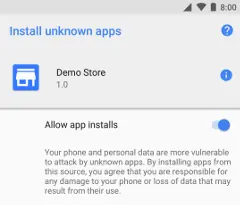
Android example: “Allow app installs” (also called “Allow from this source”).
Screenshot: Android Developers · CC BY 4.0 - Choose “Install anyway” if this prompt appearsTap Install. If you see the RizSports Play Protect prompt shown below, read the warning, then tap Install anyway to continue if you trust the APK downloaded from this page. On some phones, expand More details first.
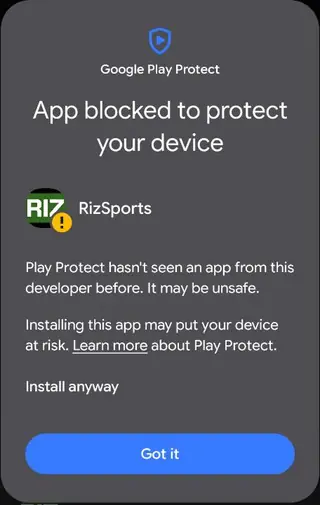 Tap “Install anyway” to continue
Actual RizSports installation screenshot. Button names can vary by Android version. Keep Play Protect enabled and read any warning before continuing. - Open RizSportsWhen installation finishes, tap Open and choose a match. You can turn off Allow from this source afterward in your phone’s settings.
Android installation help · About installation warnings
Questions
How do I update the app?
The app tells you when a new version is ready. Tap Update, then install it the same way. Your settings stay as they are; you don't need to uninstall first.
Is it safe?
Only download the app from this page. Android checks the app signature when installing an update. You can also compare your downloaded file with the published SHA-256 fingerprint:
–
The stream won't play
Check your internet connection and refresh the app. If a match has multiple stream options, try another available option. Streams may be unavailable when a match is off air.